Compare commits
No files matched your search
@@ -1,12 +0,0 @@
|
||||
# BTCPay Server payment gateway for Odoo 16, 17 and 18
|
||||
|
||||
## Accept bitcoin payments on Odoo 16, 17 and 18
|
||||
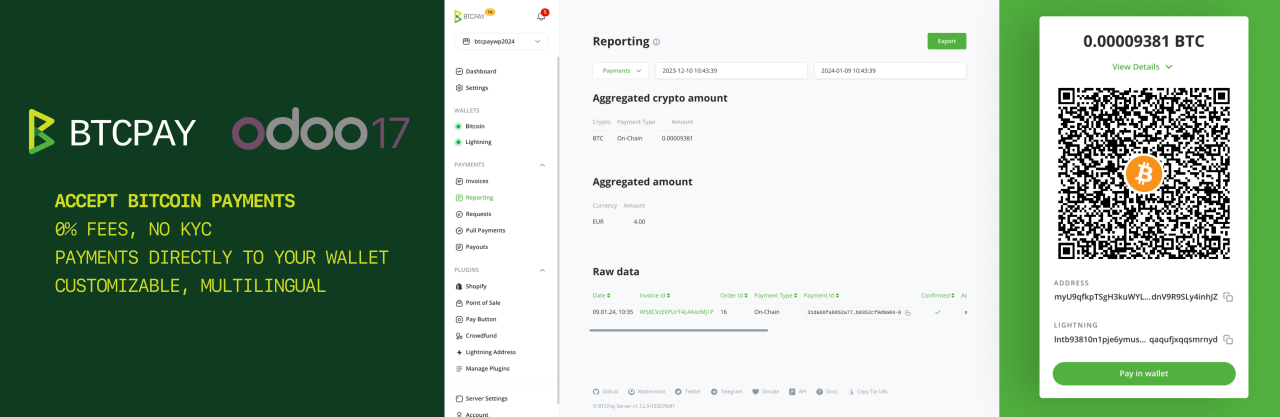
This odoo addon allows you to accept bitcoin and Lightning Network (and other cryptocurrency) payments in your Odoo e-commerce store.
|
||||
|
||||
|
||||
## How to install
|
||||
|
||||
Please find the installation instructions here:
|
||||
- [Odoo 18 documentation](https://github.com/btcpayserver/odoo/blob/18.0/payment_btcpayserver/README.md)
|
||||
- [Odoo 17 documentation](https://github.com/btcpayserver/odoo/blob/17.0/payment_btcpayserver/README.md)
|
||||
- [Odoo 16 documentation](https://github.com/btcpayserver/odoo/blob/16.0/payment_btcpayserver/README.md)
|
||||
@@ -0,0 +1,35 @@
|
||||
# payment_btcpay
|
||||
# Gateway to BTCPay for Odoo v9.0
|
||||
|
||||
## This is the module to connect Odoo 9.0 and BTCPay
|
||||
This module allow you to create an easily way to accept cryptocurrencies.
|
||||

|
||||
|
||||
## Configure Payment Acquirer
|
||||
* Install BTCPay Module -> Website -> eCommerce -> Payment Acquirers -> BTCPay
|
||||
* Put your facace. Best option is 'merchant'.
|
||||
* Put the location as test or live url. Test example url: https://testnet.demo.btcpayserver.org
|
||||
* Put the Confirmation URL where BTCpay will return after payment.
|
||||
* Check if you want that Odoo send an email to your buyer after transaction is "Confirmed"
|
||||
* Put your "Pairing Code" if you want that system get the "Token", after that "Pairing Code" will be deleted and the "Token" will appear in the corresponding field. You must safe the changes in order that this happens. NOTE: if you want to get new "Token" throw new "Pairing Code", please remove the "Token" field. Keep in mind that "Token" field must be in blank if you want to get throw the API.
|
||||
* Put your "Token" if you have it and don't want to use Pairing Code to get it. Remember, if you want to get throw API please don't write anything here.
|
||||
* If you have a Private Key you can write here otherwise system will get when you safe the Payment Acquirer
|
||||
* Remember to Publish On Website
|
||||
|
||||

|
||||
|
||||
## How it looks like?
|
||||
|
||||
In payment webpage where payment methods appear, you will find new payment method called BTCPay. If you click on it you will be redirect to the server that you indicate in location field.
|
||||
|
||||

|
||||
|
||||
|
||||
## Transaction BTCPay Details
|
||||
In transaction object, you will find more technical information about this method of payment:
|
||||
* Transaction Id: cryptocurrency transaction hash for the executed payout
|
||||
* Invoice Id: the id of the invoice for which you want to fetch an event token
|
||||
* Transaction Status: That indicates state of transaction
|
||||
* Buyer Mail Notification: Indicates if mail has been sent or if not (it will be in blank)
|
||||
|
||||

|
||||
@@ -0,0 +1,2 @@
|
||||
import controller
|
||||
import models
|
||||
@@ -0,0 +1,43 @@
|
||||
#******************************************************************************
|
||||
# PAYMENT BTCPAY FOR ODOO
|
||||
#
|
||||
# Copyright (C) 2020 Susanna Fort <susannafm@gmail.com>
|
||||
#
|
||||
#******************************************************************************
|
||||
#
|
||||
# This program is free software; you can redistribute it and/or
|
||||
# modify it under the terms of the GNU General Public License as
|
||||
# published by the Free Software Foundation; either version 2 of
|
||||
# the License, or any later version.
|
||||
#
|
||||
# This program is distributed in the hope that it will be useful,
|
||||
# but WITHOUT ANY WARRANTY; without even the implied warranty of
|
||||
# MERCHANTABILITY or FITNESS FOR A PARTICULAR PURPOSE. See the
|
||||
# GNU General Public License for more details.
|
||||
#
|
||||
# For a full copy of the GNU General Public License see the LICENSE.txt file.
|
||||
#
|
||||
#******************************************************************************
|
||||
|
||||
{
|
||||
'name': "Gateway BTCPay",
|
||||
|
||||
'summary': """This module integrates BTCPAY - pay with Bitcoin - with Odoo v9.0""",
|
||||
'author': "Vandekul",
|
||||
'website': "https://github.com/vandekul",
|
||||
'category': 'Website',
|
||||
'version': '9.0',
|
||||
'license': 'GPL-3',
|
||||
'price':'100',
|
||||
'application': True,
|
||||
'depends': ['base', 'payment'],
|
||||
'data': [
|
||||
'views/payment_btcpay_templates.xml',
|
||||
'views/btcpay_configuration_view.xml',
|
||||
'data/payment_acquirer_data.xml'
|
||||
],
|
||||
'installable': True,
|
||||
'auto_install': False,
|
||||
'description': 'static/description/index.html',
|
||||
'images': ['static/description/icon.png', 'static/description/main_screenshot.png'],
|
||||
}
|
||||
@@ -0,0 +1,4 @@
|
||||
# -*- coding: utf-8 -*-
|
||||
import main
|
||||
#import merchant_facade
|
||||
#import crypto
|
||||
@@ -1,17 +1,23 @@
|
||||
"""btcpay.client
|
||||
"""btcpay.crypto
|
||||
|
||||
BTCPay API Client.
|
||||
These are various crytography related utility functions borrowed from:
|
||||
bitpay-python: https://github.com/bitpay/bitpay-python
|
||||
"""
|
||||
|
||||
import re
|
||||
import json
|
||||
from urllib.parse import urlencode
|
||||
import urllib
|
||||
import urlparse
|
||||
import logging
|
||||
import pprint
|
||||
#from urllib.parse import urlencode
|
||||
|
||||
import requests
|
||||
from requests.exceptions import HTTPError
|
||||
|
||||
from . import crypto
|
||||
|
||||
_logger = logging.getLogger(__name__)
|
||||
|
||||
class BTCPayClient:
|
||||
def __init__(self, host, pem, insecure=False, tokens=None):
|
||||
@@ -35,19 +41,23 @@ class BTCPayClient:
|
||||
}
|
||||
|
||||
def _signed_get_request(self, path, params=None, token=None):
|
||||
token = token or list(self.tokens.values())[0]
|
||||
#token = token or list(self.tokens.values())[0]
|
||||
token = self.tokens
|
||||
params = params or dict()
|
||||
params['token'] = token
|
||||
|
||||
uri = self.host + path
|
||||
payload = '?' + urlencode(params)
|
||||
|
||||
#payload = '?' + urlencode(params)
|
||||
payload ="?token=" + params['token']
|
||||
headers = self._create_signed_headers(uri, payload)
|
||||
r = self.s.get(uri, params=params, headers=headers)
|
||||
r.raise_for_status()
|
||||
return r.json()['data']
|
||||
|
||||
def _signed_post_request(self, path, payload, token=None):
|
||||
token = token or list(self.tokens.values())[0]
|
||||
#token = token or list(self.tokens.values())[0]
|
||||
token = self.tokens
|
||||
uri = self.host + path
|
||||
payload['token'] = token
|
||||
payload = json.dumps(payload)
|
||||
@@ -98,10 +108,13 @@ class BTCPayClient:
|
||||
return rate['rate']
|
||||
|
||||
def create_invoice(self, payload, token=None):
|
||||
if re.match(r'^[A-Z]{3,3}$', payload['currency']) is None:
|
||||
raise ValueError('Currency is invalid.')
|
||||
try:
|
||||
float(payload['price'])
|
||||
except ValueError as e:
|
||||
raise ValueError('Price must be a float') from e
|
||||
raise ValueError('Price must be a float')
|
||||
|
||||
return self._signed_post_request('/invoices/', payload, token=token)
|
||||
|
||||
def get_invoice(self, invoice_id, token=None):
|
||||
@@ -142,24 +155,6 @@ class BTCPayClient:
|
||||
token = client.pair_client(code)
|
||||
return BTCPayClient(host=host, pem=pem, tokens=token)
|
||||
|
||||
@classmethod
|
||||
def create_tor_client(cls, code, host, proxy='socks5://127.0.0.1:9050'):
|
||||
""" Useful for .onion services, the `proxy` input assumes the default
|
||||
proxy header
|
||||
"""
|
||||
pem = crypto.generate_privkey()
|
||||
client = BTCPayClient(host=host, pem=pem)
|
||||
client.s.proxies = {
|
||||
'http': proxy,
|
||||
'https': proxy}
|
||||
token = client.pair_client(code)
|
||||
final_client = BTCPayClient(host=host, pem=pem, tokens=token)
|
||||
final_client.s.proxies = {
|
||||
'http': proxy,
|
||||
'https': proxy}
|
||||
return final_client
|
||||
|
||||
|
||||
def __repr__(self):
|
||||
return '{}({})'.format(
|
||||
type(self).__name__,
|
||||
@@ -0,0 +1,118 @@
|
||||
#******************************************************************************
|
||||
# PAYMENT BTCPAY FOR ODOO
|
||||
#
|
||||
# Copyright (C) 2020 Susanna Fort <susannafm@gmail.com>
|
||||
#
|
||||
#******************************************************************************
|
||||
#
|
||||
# This program is free software; you can redistribute it and/or
|
||||
# modify it under the terms of the GNU General Public License as
|
||||
# published by the Free Software Foundation; either version 2 of
|
||||
# the License, or any later version.
|
||||
#
|
||||
# This program is distributed in the hope that it will be useful,
|
||||
# but WITHOUT ANY WARRANTY; without even the implied warranty of
|
||||
# MERCHANTABILITY or FITNESS FOR A PARTICULAR PURPOSE. See the
|
||||
# GNU General Public License for more details.
|
||||
#
|
||||
# For a full copy of the GNU General Public License see the LICENSE.txt file.
|
||||
#
|
||||
#******************************************************************************
|
||||
|
||||
import json
|
||||
import logging
|
||||
import pprint
|
||||
|
||||
import requests
|
||||
import werkzeug
|
||||
|
||||
import client
|
||||
import crypto as bku
|
||||
from client import BTCPayClient
|
||||
import urllib2,cookielib
|
||||
|
||||
from openerp import api, fields, models, _
|
||||
from openerp.osv import osv
|
||||
|
||||
from openerp import http, SUPERUSER_ID
|
||||
from openerp.addons.payment.models.payment_acquirer import ValidationError
|
||||
from openerp.http import request
|
||||
|
||||
|
||||
_logger = logging.getLogger(__name__)
|
||||
|
||||
|
||||
class BtcpayController(http.Controller):
|
||||
_notify_url = '/payment/btcpay/ipn'
|
||||
|
||||
@http.route('/payment/btcpay/ipn', type='json', auth='public', methods=['POST'], csrf=False)
|
||||
def btcpay_ipn(self, **post):
|
||||
""" BTCPay IPN. """
|
||||
|
||||
_logger.info('BTCPAY IPN RECEIVED...')
|
||||
cr, uid, context, env = request.cr, SUPERUSER_ID, request.context, request.env
|
||||
acquirer = env['payment.acquirer'].search([('provider', '=', 'btcpay')])
|
||||
try:
|
||||
#for k in request.jsonrequest['data']:
|
||||
# _logger.info('\t%s => %s', k, request.jsonrequest['data'][k])
|
||||
invoiceId = request.jsonrequest['data']['id']
|
||||
invoiceStatus = request.jsonrequest['data']['status']
|
||||
orderId = request.jsonrequest['data']['orderId']
|
||||
_logger.info('Invoice ID %s => %s (Order ID %s)', invoiceId, invoiceStatus, orderId)
|
||||
|
||||
#client = BTCPayClient(host=acquirer.location, pem=acquirer.privateKey, tokens=acquirer.token)
|
||||
#self.invoice = client.get_invoice(invoiceId)
|
||||
#_logger.info('SELF INVOICE IPN %s',self.invoice)
|
||||
|
||||
if invoiceId and orderId:
|
||||
tx_ids = request.registry['payment.transaction'].search(cr, uid, [('reference', '=', orderId)], context=context)
|
||||
if tx_ids:
|
||||
tx = request.registry['payment.transaction'].browse(cr, uid, tx_ids[0], context=context)
|
||||
|
||||
tx.btcpay_status = invoiceStatus
|
||||
if invoiceStatus in ['confirmed']:
|
||||
tx.state = 'done'
|
||||
tx.sale_order_id.state = 'sale'
|
||||
if not tx.btcpay_buyerMailNotification and acquirer.buyerNotification:
|
||||
tx.sale_order_id.force_quotation_send()
|
||||
tx.btcpay_buyerMailNotification = "Send"
|
||||
tx.sale_order_id.order_line._action_procurement_create()
|
||||
elif invoiceStatus in ['paid']:
|
||||
tx.state = 'pending'
|
||||
tx.btcpay_invoiceId = invoiceId
|
||||
tx.btcpay_txid = request.jsonrequest['data']['url']
|
||||
|
||||
except Exception as e:
|
||||
_logger.error(e)
|
||||
return ''
|
||||
|
||||
|
||||
@http.route(['/btcpay/checkout'], type='http', auth='none', csrf=None, website=True)
|
||||
def checkout(self, **post):
|
||||
cr, uid, context, env = request.cr, SUPERUSER_ID, request.context, request.env
|
||||
acquirer = env['payment.acquirer'].search([('provider', '=', 'btcpay')])
|
||||
currency = env['res.currency'].browse(eval(post.get('currency_id'))).name
|
||||
base_url = request.env['ir.config_parameter'].get_param('web.base.url')
|
||||
return_url = base_url + self._notify_url
|
||||
|
||||
client = BTCPayClient(host=acquirer.location, pem=acquirer.privateKey, tokens=acquirer.token)
|
||||
|
||||
acquirer.invoice = client.create_invoice(
|
||||
{"price": post.get('amount'),
|
||||
"currency": currency,
|
||||
"orderId": post.get('reference'),
|
||||
"token": acquirer.token,
|
||||
"redirectURL": acquirer.confirmationURL,
|
||||
"notificationURL": return_url,
|
||||
"extendedNotifications": True,
|
||||
"buyer": { "email": post.get('email'),
|
||||
"name": post.get('name'),
|
||||
"address1": post.get('street'),
|
||||
"locality": post.get('city'),
|
||||
"postalCode": post.get('zip'),
|
||||
"country": post.get('country'),
|
||||
"notify": False}})
|
||||
invoiceId = dict(acquirer.invoice)['id']
|
||||
self.invoice = client.get_invoice(invoiceId)
|
||||
return werkzeug.utils.redirect(self.invoice['url'])
|
||||
|
||||
@@ -0,0 +1,36 @@
|
||||
<?xml version="1.0" encoding="utf-8"?>
|
||||
|
||||
<!--******************************************************************************
|
||||
# PAYMENT BTCPAY FOR ODOO
|
||||
#
|
||||
# Copyright (C) 2020 Susanna Fort <susannafm@gmail.com>
|
||||
#
|
||||
#******************************************************************************
|
||||
#
|
||||
# This program is free software; you can redistribute it and/or
|
||||
# modify it under the terms of the GNU General Public License as
|
||||
# published by the Free Software Foundation; either version 2 of
|
||||
# the License, or any later version.
|
||||
#
|
||||
# This program is distributed in the hope that it will be useful,
|
||||
# but WITHOUT ANY WARRANTY; without even the implied warranty of
|
||||
# MERCHANTABILITY or FITNESS FOR A PARTICULAR PURPOSE. See the
|
||||
# GNU General Public License for more details.
|
||||
#
|
||||
# For a full copy of the GNU General Public License see the LICENSE.txt file.
|
||||
#
|
||||
#******************************************************************************-->
|
||||
<openerp>
|
||||
<data noupdate="1">
|
||||
<record id="payment_acquirer_btcpay" model="payment.acquirer">
|
||||
<field name="name">BTCPay</field>
|
||||
<field name="image" type="base64" file="payment_btcpay/static/description/icon.png"/>
|
||||
<field name="provider">BTCPay</field>
|
||||
<field name="company_id" ref="base.main_company"/>
|
||||
<field name="view_template_id" ref="btcpay_acquirer_form"/>
|
||||
<field name="environment">test</field>
|
||||
<field name="pre_msg"><![CDATA[
|
||||
<p><br>You will be redirected to BTCPay website after clicking on the payment button.</p>]]></field>
|
||||
</record>
|
||||
</data>
|
||||
</openerp>
|
||||
@@ -0,0 +1 @@
|
||||
import btcpay
|
||||
@@ -0,0 +1,82 @@
|
||||
#******************************************************************************
|
||||
# PAYMENT BTCPAY FOR ODOO
|
||||
#
|
||||
# Copyright (C) 2020 Susanna Fort <susannafm@gmail.com>
|
||||
#
|
||||
#******************************************************************************
|
||||
#
|
||||
# This program is free software; you can redistribute it and/or
|
||||
# modify it under the terms of the GNU General Public License as
|
||||
# published by the Free Software Foundation; either version 2 of
|
||||
# the License, or any later version.
|
||||
#
|
||||
# This program is distributed in the hope that it will be useful,
|
||||
# but WITHOUT ANY WARRANTY; without even the implied warranty of
|
||||
# MERCHANTABILITY or FITNESS FOR A PARTICULAR PURPOSE. See the
|
||||
# GNU General Public License for more details.
|
||||
#
|
||||
# For a full copy of the GNU General Public License see the LICENSE.txt file.
|
||||
#
|
||||
#******************************************************************************
|
||||
|
||||
from openerp import api, fields, models, _
|
||||
from openerp.osv import osv
|
||||
from ..controller import crypto as bku
|
||||
from ..controller.client import BTCPayClient
|
||||
|
||||
import logging
|
||||
import pprint
|
||||
|
||||
from openerp import http, SUPERUSER_ID
|
||||
|
||||
_logger = logging.getLogger(__name__)
|
||||
|
||||
class AcquirerBtcPay(models.Model):
|
||||
_inherit = 'payment.acquirer'
|
||||
|
||||
def _get_providers(self, cr, uid, context=None):
|
||||
providers = super(AcquirerBtcPay, self)._get_providers(cr, uid, context=context)
|
||||
providers.append(['btcpay', 'btcpay'])
|
||||
return providers
|
||||
|
||||
token = fields.Char('Token', help='Access Token to BTCPay')
|
||||
privateKey = fields.Text('Private Key', help='Private Key for BTCPay Client')
|
||||
facade = fields.Char('Facade', help='Token facade type: merchant/pos/payroll') #merchant
|
||||
pairingCode = fields.Char('Pairing Code', help='Create a paring Code in your BTCPay server and put here')
|
||||
location = fields.Char('Location', size=64)
|
||||
confirmationURL = fields.Char('Confirmation URL', help='Confirmation URL to return after Btcpay payment')
|
||||
buyerNotification = fields.Boolean('Odoo confirmation mail to buyer', help='If it is checked, Odoo will send the confirmation mail defined')
|
||||
|
||||
_defaults = {
|
||||
'facade': 'merchant',
|
||||
'location':'https://testnet.demo.btcpayserver.org', #Testnet BTCPay
|
||||
'confirmationURL':'http://odoo-dev.zynthian.org/shop/confirmation',
|
||||
'buyerNotification': 'True',
|
||||
}
|
||||
|
||||
|
||||
def create(self, cr, uid, values, context=None):
|
||||
if values.get('provider') == 'btcpay' and not values.get('privateKey'):
|
||||
values['privateKey'] = bku.generate_privkey()
|
||||
return super(AcquirerBtcPay, self).create(cr, uid, values, context=context)
|
||||
|
||||
@api.onchange('pairingCode')
|
||||
def _onchange_pairingCode(self):
|
||||
if not self.token and self.provider == 'btcpay':
|
||||
client = BTCPayClient(host=self.location, pem=self.privateKey)
|
||||
token = client.pair_client(self.pairingCode)
|
||||
self.token = token.get(self.facade)
|
||||
|
||||
@api.onchange('token')
|
||||
def _onchange_token(self):
|
||||
if self.provider == 'btcpay':
|
||||
self.pairingCode = ''
|
||||
|
||||
|
||||
class BtcPayTransaction(models.Model):
|
||||
_inherit = "payment.transaction"
|
||||
btcpay_invoiceId = fields.Char("Invoice Id")
|
||||
btcpay_txid = fields.Char("Transaction Id")
|
||||
btcpay_status = fields.Char("Transaction Status")
|
||||
btcpay_buyerMailNotification = fields.Char("Buyer Mail Notification")
|
||||
acquirer_name = fields.Selection(related='acquirer_id.provider')
|
||||

|
After Width: | Height: | Size: 37 KiB |

|
After Width: | Height: | Size: 92 KiB |

|
After Width: | Height: | Size: 71 KiB |

|
After Width: | Height: | Size: 22 KiB |


|
After Width: | Height: | Size: 9.5 KiB |

@@ -0,0 +1,89 @@
|
||||
<html xmlns="http://www.w3.org/1999/html">
|
||||
<body>
|
||||
|
||||
<section class="oe_container">
|
||||
<div class="oe_row oe_spaced">
|
||||
<h2 class="oe_slogan">BTCPay Gateway</h2>
|
||||
<h3 class="oe_slogan">This is the module to connect Odoo 9.0 and Btcpay</h3>
|
||||
<div class="oe_span6">
|
||||
<div class="oe_bg_img">
|
||||
<img src="Btcpay_com.png" class="oe_picture oe_screenshot">
|
||||
</div>
|
||||
</div>
|
||||
<div class="oe_span6">
|
||||
<p class='oe_mt32'>
|
||||
This module allow you to create an easily way to accept Bitcoins.
|
||||
</p>
|
||||
</div>
|
||||
</div>
|
||||
</section>
|
||||
|
||||
<section class="oe_container">
|
||||
<div class="oe_row oe_spaced">
|
||||
<h2 class="oe_slogan">Configure Payment Acquirer</h2>
|
||||
<div class="oe_span6">
|
||||
<p class='oe_mt32'>
|
||||
<ul>
|
||||
<li>Install BTCPay Module -> Website -> eCommerce -> Payment Acquirers -> BTCPay</li>
|
||||
<li>Put your facace. Best option is 'merchant'.</li>
|
||||
<li>Put the location as test or live url. Test example url: https://testnet.demo.btcpayserver.org</li>
|
||||
<li>Put the Confirmation URL where BTCpay will return after payment.</li>
|
||||
<li>Check if you want that Odoo send an email to your buyer after transaction is "Confirmed"</li>
|
||||
<li>Put your "Pairing Code" if you want that system get the "Token", after that "Pairing Code" will be deleted and the "Token" will appear in the corresponding field. You must safe the changes in order that this happens. NOTE: if you want to get new "Token" throw new "Pairing Code", please remove the "Token" field. Keep in mind that "Token" field must be in blank if you want to get throw the API.</li>
|
||||
<li>Put your "Token" if you have it and don't want to use Pairing Code to get it. Remember, if you want to get throw API please don't write anything here.</li>
|
||||
<li>If you have a Private Key you can write here otherwise system will get when you safe the Payment Acquirer </li>
|
||||
<li>Remember to Publish On Website</li>
|
||||
</ul>
|
||||
</p>
|
||||
</div>
|
||||
<div class="oe_span6">
|
||||
<div class="oe_bg_img">
|
||||
<img src="BTCPayPaymentAcquirer.png" class="oe_picture oe_screenshot">
|
||||
</div>
|
||||
</div>
|
||||
</div>
|
||||
</section>
|
||||
|
||||
<section class="oe_container">
|
||||
<div class="oe_row oe_spaced">
|
||||
<h2 class="oe_slogan">How it looks like?</h2>
|
||||
<div class="oe_span6">
|
||||
<div class="oe_bg_img">
|
||||
<img src="BTCPayLooksLike.png" class="oe_picture oe_screenshot">
|
||||
</div>
|
||||
</div>
|
||||
<div class="oe_span6">
|
||||
<p class='oe_mt32'>
|
||||
<ul>
|
||||
In payment webpage where payment methods appear, you will find new payment method called BTCPay.
|
||||
If you click on it you will be redirect to the server that you indicate in location field.
|
||||
</ul>
|
||||
</p>
|
||||
</div>
|
||||
</div>
|
||||
</section>
|
||||
|
||||
<section class="oe_container">
|
||||
<div class="oe_row oe_spaced">
|
||||
<h2 class="oe_slogan">Transaction BTCPay Details</h2>
|
||||
<div class="oe_span6">
|
||||
<p class='oe_mt32'>
|
||||
<ul>
|
||||
In transaction object, you will find more technical information about this method of payment:
|
||||
<li>Transaction Id: cryptocurrency transaction hash for the executed payout.</li>
|
||||
<li>Invoice Id: the id of the invoice for which you want to fetch an event token</li>
|
||||
<li>Transaction Status: That indicates state of transaction</li>
|
||||
<li>Buyer Mail Notification: Indicates if mail has been sent or if not (it will be in blank)</li>
|
||||
</ul>
|
||||
</p>
|
||||
</div>
|
||||
<div class="oe_span6">
|
||||
<div class="oe_bg_img">
|
||||
<img src="BtcpayTxDetails.png" class="oe_picture oe_screenshot">
|
||||
</div>
|
||||
</div>
|
||||
</div>
|
||||
</section>
|
||||
|
||||
</body>
|
||||
</html>
|
||||

|
After Width: | Height: | Size: 30 KiB |

|
After Width: | Height: | Size: 23 KiB |

|
After Width: | Height: | Size: 10 KiB |

@@ -0,0 +1 @@
|
||||
Bitcoin-Lightning-Network.png
|
||||

|
After Width: | Height: | Size: 4.7 KiB |
@@ -0,0 +1,2 @@
|
||||
# -*- coding: utf-8 -*-
|
||||
from . import btcpay_test
|
||||
@@ -0,0 +1,244 @@
|
||||
NEW ++++++++++++++++++++++++++++++++++++++++++++++++++++++++++++++++++++++++++++++++++++++++++++++++++
|
||||
|
||||
': {u'BTC': u'tb1q6xglf49usp7hvz57hcn5s3ela0z7784xzxc6zz'},
|
||||
u'amountPaid': 0,
|
||||
u'bitcoinAddress': u'tb1q6xglf49usp7hvz57hcn5s3ela0z7784xzxc6zz',
|
||||
u'btcDue': u'0.00016569',
|
||||
u'btcPaid': u'0.00000000',
|
||||
u'btcPrice': u'0.00016569',
|
||||
u'buyer': {u'address1': u'Carretera Rubi\xf3',
|
||||
u'address2': None,
|
||||
u'country': None,
|
||||
u'email': u'cristina@solis.com',
|
||||
u'locality': None,
|
||||
u'name': u'Maria Cristina Sol\xeds',
|
||||
u'phone': None,
|
||||
u'postalCode': None,
|
||||
u'region': None},
|
||||
u'buyerPaidBtcMinerFee': None,
|
||||
u'buyerTotalBtcAmount': None,
|
||||
u'cryptoInfo': [{u'address': u'tb1q6xglf49usp7hvz57hcn5s3ela0z7784xzxc6zz',
|
||||
u'cryptoCode': u'BTC',
|
||||
u'cryptoPaid': u'0.00000000',
|
||||
u'due': u'0.00016569',
|
||||
u'exRates': {u'EUR': 0.0},
|
||||
u'networkFee': u'0.00000000',
|
||||
u'paid': u'0.00000000',
|
||||
u'paymentType': u'BTCLike',
|
||||
u'paymentUrls': {u'BIP21': u'bitcoin:tb1q6xglf49usp7hvz57hcn5s3ela0z7784xzxc6zz?amount=0.00016569',
|
||||
u'BIP72': None,
|
||||
u'BIP72b': None,
|
||||
u'BIP73': None,
|
||||
u'BOLT11': None},
|
||||
u'payments': [],
|
||||
u'price': u'0.00016569',
|
||||
u'rate': 6035.635,
|
||||
u'totalDue': u'0.00016569',
|
||||
u'txCount': 0,
|
||||
u'url': u'https://testnet.demo.btcpayserver.org/i/BTC/8Ne9cafEfuJTX5qBMMVFVa'}],
|
||||
u'currency': u'EUR',
|
||||
u'currentTime': 1585230897038,
|
||||
u'exRates': {u'EUR': 0.0},
|
||||
u'exceptionStatus': False,
|
||||
u'exchangeRates': {u'BTC': {u'EUR': 0.0}},
|
||||
u'expirationTime': 1585231795000,
|
||||
u'flags': {u'refundable': False},
|
||||
u'guid': u'e1913afa-136c-415c-bf5d-bcd9bb817b0d',
|
||||
u'id': u'8Ne9cafEfuJTX5qBMMVFVa',
|
||||
u'invoiceTime': 1585230895000,
|
||||
u'itemCode': None,
|
||||
u'itemDesc': None,
|
||||
u'lowFeeDetected': False,
|
||||
u'minerFees': {u'BTC': {u'satoshisPerByte': 1.0, u'totalFee': 0.0}},
|
||||
u'orderId': u'SO3166',
|
||||
u'paymentCodes': {u'BTC': {u'BIP21': u'bitcoin:tb1q6xglf49usp7hvz57hcn5s3ela0z7784xzxc6zz?amount=0.00016569',
|
||||
u'BIP72': None,
|
||||
u'BIP72b': None,
|
||||
u'BIP73': None,
|
||||
u'BOLT11': None}},
|
||||
u'paymentSubtotals': {u'BTC': 16569.0},
|
||||
u'paymentTotals': {u'BTC': 16569.0},
|
||||
u'paymentUrls': {u'BIP21': u'bitcoin:tb1q6xglf49usp7hvz57hcn5s3ela0z7784xzxc6zz?amount=0.00016569',
|
||||
u'BIP72': None,
|
||||
u'BIP72b': None,
|
||||
u'BIP73': None,
|
||||
u'BOLT11': None},
|
||||
u'posData': None,
|
||||
u'price': 1.0,
|
||||
u'rate': 6035.635,
|
||||
u'refundAddressRequestPending': False,
|
||||
u'status': u'new',
|
||||
u'supportedTransactionCurrencies': {u'BTC': {u'enabled': True,
|
||||
u'reason': None}},
|
||||
u'token': u'Xf3ji4rhcZc7QoKNyzorFq',
|
||||
u'url': u'https://testnet.demo.btcpayserver.org/invoice?id=8Ne9cafEfuJTX5qBMMVFVa'}
|
||||
|
||||
|
||||
|
||||
|
||||
PAID +++++++++++++++++++++++++++++++++++++++++++++++++++++++++++++++++++++++++++++++++++++++
|
||||
|
||||
|
||||
{u'addresses': {u'BTC': u'tb1q6xglf49usp7hvz57hcn5s3ela0z7784xzxc6zz'},
|
||||
u'amountPaid': 0,
|
||||
u'bitcoinAddress': u'tb1q6xglf49usp7hvz57hcn5s3ela0z7784xzxc6zz',
|
||||
u'btcDue': u'0.00000000',
|
||||
u'btcPaid': u'0.00016569',
|
||||
u'btcPrice': u'0.00016569',
|
||||
u'buyer': {u'address1': u'Carretera Rubi\xf3',
|
||||
u'address2': None,
|
||||
u'country': None,
|
||||
u'email': u'cristina@solis.com',
|
||||
u'locality': None,
|
||||
u'name': u'Maria Cristina Sol\xeds',
|
||||
u'phone': None,
|
||||
u'postalCode': None,
|
||||
u'region': None},
|
||||
u'buyerPaidBtcMinerFee': None,
|
||||
u'buyerTotalBtcAmount': None,
|
||||
u'cryptoInfo': [{u'address': u'tb1q6xglf49usp7hvz57hcn5s3ela0z7784xzxc6zz',
|
||||
u'cryptoCode': u'BTC',
|
||||
u'cryptoPaid': u'0.00016569',
|
||||
u'due': u'0.00000000',
|
||||
u'exRates': {u'EUR': 0.0},
|
||||
u'networkFee': u'0.00000000',
|
||||
u'paid': u'0.00016569',
|
||||
u'paymentType': u'BTCLike',
|
||||
u'paymentUrls': {u'BIP21': u'bitcoin:tb1q6xglf49usp7hvz57hcn5s3ela0z7784xzxc6zz?amount=0.00',
|
||||
u'BIP72': None,
|
||||
u'BIP72b': None,
|
||||
u'BIP73': None,
|
||||
u'BOLT11': None},
|
||||
u'payments': [{u'completed': False,
|
||||
u'confirmed': False,
|
||||
u'destination': u'tb1q6xglf49usp7hvz57hcn5s3ela0z7784xzxc6zz',
|
||||
u'fee': 0.0,
|
||||
u'id': u'8e334ae16f57eca9ca6a1c2fe8de0aa3fe85a07f3fe64aab2a08657b7e185239-1',
|
||||
u'paymentType': u'BTCLike',
|
||||
u'receivedDate': u'2020-03-26T13:56:39',
|
||||
u'value': 0.00016569}],
|
||||
u'price': u'0.00016569',
|
||||
u'rate': 6035.635,
|
||||
u'totalDue': u'0.00016569',
|
||||
u'txCount': 1,
|
||||
u'url': u'https://testnet.demo.btcpayserver.org/i/BTC/8Ne9cafEfuJTX5qBMMVFVa'}],
|
||||
u'currency': u'EUR',
|
||||
u'currentTime': 1585231001490,
|
||||
u'exRates': {u'EUR': 0.0},
|
||||
u'exceptionStatus': False,
|
||||
u'exchangeRates': {u'BTC': {u'EUR': 0.0}},
|
||||
u'expirationTime': 1585231795000,
|
||||
u'flags': {u'refundable': False},
|
||||
u'guid': u'0247206a-d05b-4f00-b679-d7261aca0714',
|
||||
u'id': u'8Ne9cafEfuJTX5qBMMVFVa',
|
||||
u'invoiceTime': 1585230895000,
|
||||
u'itemCode': None,
|
||||
u'itemDesc': None,
|
||||
u'lowFeeDetected': False,
|
||||
u'minerFees': {u'BTC': {u'satoshisPerByte': 1.0, u'totalFee': 0.0}},
|
||||
u'orderId': u'SO3166',
|
||||
u'paymentCodes': {u'BTC': {u'BIP21': u'bitcoin:tb1q6xglf49usp7hvz57hcn5s3ela0z7784xzxc6zz?amount=0.00',
|
||||
u'BIP72': None,
|
||||
u'BIP72b': None,
|
||||
u'BIP73': None,
|
||||
u'BOLT11': None}},
|
||||
u'paymentSubtotals': {u'BTC': 16569.0},
|
||||
u'paymentTotals': {u'BTC': 16569.0},
|
||||
u'paymentUrls': {u'BIP21': u'bitcoin:tb1q6xglf49usp7hvz57hcn5s3ela0z7784xzxc6zz?amount=0.00',
|
||||
u'BIP72': None,
|
||||
u'BIP72b': None,
|
||||
u'BIP73': None,
|
||||
u'BOLT11': None},
|
||||
u'posData': None,
|
||||
u'price': 1.0,
|
||||
u'rate': 6035.635,
|
||||
u'refundAddressRequestPending': False,
|
||||
u'status': u'paid',
|
||||
u'supportedTransactionCurrencies': {u'BTC': {u'enabled': True,
|
||||
u'reason': None}},
|
||||
u'token': u'SV24W1puvz1ZqaHj9nb6vx',
|
||||
u'url': u'https://testnet.demo.btcpayserver.org/invoice?id=8Ne9cafEfuJTX5qBMMVFVa'}
|
||||
|
||||
|
||||
|
||||
CONFIRMED ++++++++++++++++++++++++++++++++++++++++++++++++++++++++++++++++++++++++++++++++++
|
||||
|
||||
{u'addresses': {u'BTC': u'tb1q6xglf49usp7hvz57hcn5s3ela0z7784xzxc6zz'},
|
||||
u'amountPaid': 0,
|
||||
u'bitcoinAddress': u'tb1q6xglf49usp7hvz57hcn5s3ela0z7784xzxc6zz',
|
||||
u'btcDue': u'0.00000000',
|
||||
u'btcPaid': u'0.00016569',
|
||||
u'btcPrice': u'0.00016569',
|
||||
u'buyer': {u'address1': u'Carretera Rubi\xf3',
|
||||
u'address2': None,
|
||||
u'country': None,
|
||||
u'email': u'cristina@solis.com',
|
||||
u'locality': None,
|
||||
u'name': u'Maria Cristina Sol\xeds',
|
||||
u'phone': None,
|
||||
u'postalCode': None,
|
||||
u'region': None},
|
||||
u'buyerPaidBtcMinerFee': None,
|
||||
u'buyerTotalBtcAmount': None,
|
||||
u'cryptoInfo': [{u'address': u'tb1q6xglf49usp7hvz57hcn5s3ela0z7784xzxc6zz',
|
||||
u'cryptoCode': u'BTC',
|
||||
u'cryptoPaid': u'0.00016569',
|
||||
u'due': u'0.00000000',
|
||||
u'exRates': {u'EUR': 0.0},
|
||||
u'networkFee': u'0.00000000',
|
||||
u'paid': u'0.00016569',
|
||||
u'paymentType': u'BTCLike',
|
||||
u'paymentUrls': {u'BIP21': u'bitcoin:tb1q6xglf49usp7hvz57hcn5s3ela0z7784xzxc6zz?amount=0.00',
|
||||
u'BIP72': None,
|
||||
u'BIP72b': None,
|
||||
u'BIP73': None,
|
||||
u'BOLT11': None},
|
||||
u'payments': [{u'completed': False,
|
||||
u'confirmed': True,
|
||||
u'destination': u'tb1q6xglf49usp7hvz57hcn5s3ela0z7784xzxc6zz',
|
||||
u'fee': 0.0,
|
||||
u'id': u'8e334ae16f57eca9ca6a1c2fe8de0aa3fe85a07f3fe64aab2a08657b7e185239-1',
|
||||
u'paymentType': u'BTCLike',
|
||||
u'receivedDate': u'2020-03-26T13:56:39',
|
||||
u'value': 0.00016569}],
|
||||
u'price': u'0.00016569',
|
||||
u'rate': 6035.635,
|
||||
u'totalDue': u'0.00016569',
|
||||
u'txCount': 1,
|
||||
u'url': u'https://testnet.demo.btcpayserver.org/i/BTC/8Ne9cafEfuJTX5qBMMVFVa'}],
|
||||
u'currency': u'EUR',
|
||||
u'currentTime': 1585231286866,
|
||||
u'exRates': {u'EUR': 0.0},
|
||||
u'exceptionStatus': False,
|
||||
u'exchangeRates': {u'BTC': {u'EUR': 0.0}},
|
||||
u'expirationTime': 1585231795000,
|
||||
u'flags': {u'refundable': False},
|
||||
u'guid': u'3e236c9a-290b-45ee-ad2f-529c2b9ef392',
|
||||
u'id': u'8Ne9cafEfuJTX5qBMMVFVa',
|
||||
u'invoiceTime': 1585230895000,
|
||||
u'itemCode': None,
|
||||
u'itemDesc': None,
|
||||
u'lowFeeDetected': False,
|
||||
u'minerFees': {u'BTC': {u'satoshisPerByte': 1.0, u'totalFee': 0.0}},
|
||||
u'orderId': u'SO3166',
|
||||
u'paymentCodes': {u'BTC': {u'BIP21': u'bitcoin:tb1q6xglf49usp7hvz57hcn5s3ela0z7784xzxc6zz?amount=0.00',
|
||||
u'BIP72': None,
|
||||
u'BIP72b': None,
|
||||
u'BIP73': None,
|
||||
u'BOLT11': None}},
|
||||
u'paymentSubtotals': {u'BTC': 16569.0},
|
||||
u'paymentTotals': {u'BTC': 16569.0},
|
||||
u'paymentUrls': {u'BIP21': u'bitcoin:tb1q6xglf49usp7hvz57hcn5s3ela0z7784xzxc6zz?amount=0.00',
|
||||
u'BIP72': None,
|
||||
u'BIP72b': None,
|
||||
u'BIP73': None,
|
||||
u'BOLT11': None},
|
||||
u'posData': None,
|
||||
u'price': 1.0,
|
||||
u'rate': 6035.635,
|
||||
u'refundAddressRequestPending': False,
|
||||
u'status': u'confirmed',
|
||||
u'supportedTransactionCurrencies': {u'BTC': {u'enabled': True,
|
||||
u'reason': None}},
|
||||
u'token': u'S8QfFkkTLY6GmrrauWMmHL',
|
||||
u'url': u'https://testnet.demo.btcpayserver.org/invoice?id=8Ne9cafEfuJTX5qBMMVFVa'}
|
||||
@@ -0,0 +1,61 @@
|
||||
import pprint
|
||||
import logging
|
||||
import requests
|
||||
import json
|
||||
import re
|
||||
import os.path
|
||||
#import bitpay_key_utils as bku
|
||||
#from bitpay_client import *
|
||||
|
||||
import btcpay.crypto
|
||||
from btcpay import BTCPayClient
|
||||
|
||||
API_HOST = "https://testnet.demo.btcpayserver.org" #Testnet BTCPAY
|
||||
KEY_FILE = "/tmp/key.priv"
|
||||
TOKEN_FILE = "/tmp/btctoken.priv"
|
||||
|
||||
if os.path.isfile(KEY_FILE):
|
||||
f = open(KEY_FILE, 'r')
|
||||
key = f.read()
|
||||
f.close()
|
||||
print("Creating a bitpay client using existing private key from disk.")
|
||||
else:
|
||||
key = btcpay.crypto.generate_privkey()
|
||||
f = open(KEY_FILE, 'w')
|
||||
f.write(key)
|
||||
f.close()
|
||||
|
||||
client = BTCPayClient(host=API_HOST, pem=key)
|
||||
|
||||
|
||||
def fetch_token(facade, pairingCode):
|
||||
if os.path.isfile(TOKEN_FILE + facade):
|
||||
f = open(TOKEN_FILE + facade, 'r')
|
||||
token = f.read()
|
||||
f.close()
|
||||
client.tokens[facade] = token
|
||||
else:
|
||||
token = client.pair_client(pairingCode)
|
||||
client.tokens[facade] = token
|
||||
f = open(TOKEN_FILE + facade, 'w')
|
||||
print(token[facade])
|
||||
f.write(token[facade])
|
||||
f.close()
|
||||
|
||||
pairingCode = "otMSapf"
|
||||
facade = "merchant"
|
||||
fetch_token(facade, pairingCode)
|
||||
print(client.tokens[facade])
|
||||
|
||||
client = BTCPayClient(host=API_HOST, pem=key, tokens=client.tokens)
|
||||
print(client)
|
||||
#fetch_token(facade, pairingCode)
|
||||
#print("Token: ", client.tokens[facade])
|
||||
new_invoice = client.create_invoice({"price": 20, "currency": "EUR", "token": client.tokens[facade],"extendedNotifications": True})
|
||||
print("NEW INVOICE: ", new_invoice)
|
||||
|
||||
fetched_invoice = client.get_invoice(new_invoice['id'])
|
||||
print("FETCHED INVOICE: ", new_invoice['id'])
|
||||
|
||||
|
||||
curl --no-keepalive --raw --show-error --verbose --connect-timeout 10 --insecure --max-redirs 1 -H "Content-Type: application/json" -d '{"data": "{"id":"8vQMp1C6gB1DxUyJB9gcBp"}"}" http://odoo-dev.zynthian.org/payment/btcpay/ipn
|
||||
@@ -0,0 +1,12 @@
|
||||
import requests
|
||||
import json
|
||||
|
||||
url = 'https://odoo-dev.zynthian.org/payment/btcpay/ipn'
|
||||
headers = {'Content-Type': 'application/json'}
|
||||
data = {
|
||||
"data": {
|
||||
"id":"8vQMp1C6gB1DxUyJB9gcBp",
|
||||
}
|
||||
}
|
||||
data_json = json.dumps(data)
|
||||
r = requests.post(url=url, data=data_json, headers=headers)
|
||||
@@ -0,0 +1,62 @@
|
||||
<?xml version="1.0" encoding="utf-8"?>
|
||||
<!--******************************************************************************
|
||||
# PAYMENT BTCPAY FOR ODOO
|
||||
#
|
||||
# Copyright (C) 2020 Susanna Fort <susannafm@gmail.com>
|
||||
#
|
||||
#******************************************************************************
|
||||
#
|
||||
# This program is free software; you can redistribute it and/or
|
||||
# modify it under the terms of the GNU General Public License as
|
||||
# published by the Free Software Foundation; either version 2 of
|
||||
# the License, or any later version.
|
||||
#
|
||||
# This program is distributed in the hope that it will be useful,
|
||||
# but WITHOUT ANY WARRANTY; without even the implied warranty of
|
||||
# MERCHANTABILITY or FITNESS FOR A PARTICULAR PURPOSE. See the
|
||||
# GNU General Public License for more details.
|
||||
#
|
||||
# For a full copy of the GNU General Public License see the LICENSE.txt file.
|
||||
#
|
||||
#******************************************************************************-->
|
||||
|
||||
<openerp>
|
||||
<data>
|
||||
<record id="acquirer_form_btcpay" model="ir.ui.view">
|
||||
<field name="name">acquirer.form.btcpay</field>
|
||||
<field name="model">payment.acquirer</field>
|
||||
<field name="inherit_id" ref="payment.acquirer_form"/>
|
||||
<field name="arch" type="xml">
|
||||
<xpath expr='//group[@name="acquirer"]' position='after'>
|
||||
<group attrs="{'invisible': [('provider', '!=', 'btcpay')]}">
|
||||
<field name="facade"/>
|
||||
<field name="location"/>
|
||||
<field name="confirmationURL"/>
|
||||
<field name="buyerNotification"/>
|
||||
<field name="pairingCode"/>
|
||||
<field name="token"/>
|
||||
<field name="privateKey"/>
|
||||
</group>
|
||||
</xpath>
|
||||
</field>
|
||||
</record>
|
||||
|
||||
<record id="transaction_form_btcpay" model="ir.ui.view">
|
||||
<field name="name">acquirer.transaction.form.btcpay</field>
|
||||
<field name="model">payment.transaction</field>
|
||||
<field name="inherit_id" ref="payment.transaction_form"/>
|
||||
<field name="arch" type="xml">
|
||||
<xpath expr='//notebook' position='inside'>
|
||||
<page string="Btcpay TX Details">
|
||||
<group>
|
||||
<field name="btcpay_txid"/>
|
||||
<field name="btcpay_invoiceId" />
|
||||
<field name="btcpay_status"/>
|
||||
<field name="btcpay_buyerMailNotification"/>
|
||||
</group>
|
||||
</page>
|
||||
</xpath>
|
||||
</field>
|
||||
</record>
|
||||
</data>
|
||||
</openerp>
|
||||
@@ -0,0 +1,32 @@
|
||||
<?xml version="1.0" encoding="utf-8"?>
|
||||
<!--******************************************************************************
|
||||
# PAYMENT BTCPAY FOR ODOO
|
||||
#
|
||||
# Copyright (C) 2020 Susanna Fort <susannafm@gmail.com>
|
||||
#
|
||||
#******************************************************************************
|
||||
#
|
||||
# This program is free software; you can redistribute it and/or
|
||||
# modify it under the terms of the GNU General Public License as
|
||||
# published by the Free Software Foundation; either version 2 of
|
||||
# the License, or any later version.
|
||||
#
|
||||
# This program is distributed in the hope that it will be useful,
|
||||
# but WITHOUT ANY WARRANTY; without even the implied warranty of
|
||||
# MERCHANTABILITY or FITNESS FOR A PARTICULAR PURPOSE. See the
|
||||
# GNU General Public License for more details.
|
||||
#
|
||||
# For a full copy of the GNU General Public License see the LICENSE.txt file.
|
||||
#
|
||||
#******************************************************************************-->
|
||||
|
||||
<openerp>
|
||||
<data>
|
||||
<!--BtcPay Top Menu-->
|
||||
<menuitem id="btcpay_main_menu" name="BtcPay" icon="terp-sale" sequence="1"/>
|
||||
|
||||
<!--Main Menus-->
|
||||
<menuitem id="btcpay_configuration_menu" action="action_btcpay_instance" name="Configuration"
|
||||
parent="btcpay_main_menu" sequence="0"/>
|
||||
</data>
|
||||
</openerp>
|
||||
@@ -0,0 +1,47 @@
|
||||
<?xml version="1.0" encoding="utf-8"?>
|
||||
<!--******************************************************************************
|
||||
# PAYMENT BTCPAY FOR ODOO
|
||||
#
|
||||
# Copyright (C) 2020 Susanna Fort <susannafm@gmail.com>
|
||||
#
|
||||
#******************************************************************************
|
||||
#
|
||||
# This program is free software; you can redistribute it and/or
|
||||
# modify it under the terms of the GNU General Public License as
|
||||
# published by the Free Software Foundation; either version 2 of
|
||||
# the License, or any later version.
|
||||
#
|
||||
# This program is distributed in the hope that it will be useful,
|
||||
# but WITHOUT ANY WARRANTY; without even the implied warranty of
|
||||
# MERCHANTABILITY or FITNESS FOR A PARTICULAR PURPOSE. See the
|
||||
# GNU General Public License for more details.
|
||||
#
|
||||
# For a full copy of the GNU General Public License see the LICENSE.txt file.
|
||||
#
|
||||
#******************************************************************************-->
|
||||
|
||||
<openerp>
|
||||
<data>
|
||||
<template id="btcpay_acquirer_form" name="Btcpay Payment Button">
|
||||
<form t-if="acquirer" action="/btcpay/checkout" method="post" target="_self">
|
||||
<input type="hidden" name="acquirer" t-att-value="acquirer.id"/>
|
||||
<input type="hidden" name="reference" t-att-value="reference"/>
|
||||
<input type="hidden" name="name" t-att-value="partner_name"/>
|
||||
<input type="hidden" name="email" t-att-value="partner_email"/>
|
||||
<input type="hidden" name="street" t-att-value="partner_address"/>
|
||||
<input type="hidden" name="zip" t-att-value="partner_zip"/>
|
||||
<input type="hidden" name="city" t-att-value="partner_city"/>
|
||||
<input type="hidden" name="currency_id" t-att-value="currency_id"/>
|
||||
<input type="hidden" name="country" t-att-value="partner_country_id"/>
|
||||
<input type="hidden" name="custom" t-att-value="custom"/>
|
||||
<input type="hidden" name="amount" t-att-value="amount"/>
|
||||
<button type="submit" width="100px" t-att-class="submit_class">
|
||||
<img t-if="not submit_txt" src="/static/description/icon.png"/>
|
||||
<span t-if="submit_txt"> <t t-esc="submit_txt"/> <span class="fa fa-long-arrow-right"/>
|
||||
</span>
|
||||
</button>
|
||||
</form>
|
||||
</template>
|
||||
</data>
|
||||
</openerp>
|
||||
|
||||
@@ -1,73 +0,0 @@
|
||||
# BTCPay Server payment gateway for Odoo 18 / 19
|
||||
|
||||
## This is the module to connect Odoo 18 / 19 and BTCPay Server
|
||||
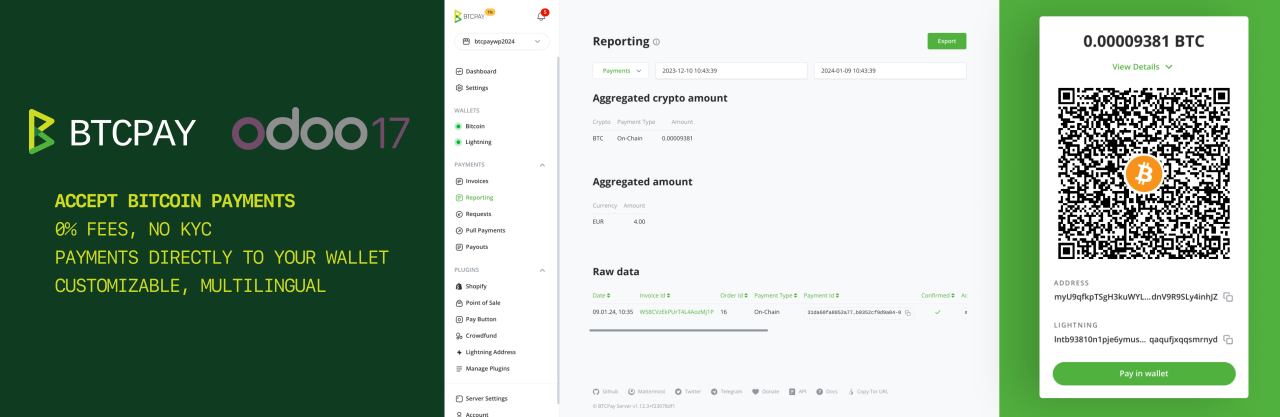
This module allows you to accept bitcoin (and other cryptocurrency) payments in your Odoo e-commerce store.
|
||||
|
||||
|
||||
:::tip
|
||||
If you use Odoo 16 you can find the documentation [here](https://github.com/btcpayserver/odoo/blob/16.0/payment_btcpayserver/README.md) and for Odoo 17 [here](https://github.com/btcpayserver/odoo/blob/17.0/payment_btcpayserver/README.md).
|
||||
:::
|
||||
|
||||
:::tip
|
||||
The following instructions work for Odoo 18 and 19. You just need to make sure to download the matching branch release or use the matching branch (18.0 or 19.0) mentioned in the steps below.
|
||||
:::
|
||||
|
||||
## Install the module
|
||||
* Clone our [repository](https://github.com/btcpayserver/odoo) or download the .zip from the [releases page](https://github.com/btcpayserver/odoo/releases)
|
||||
* Make sure you are on branch `19.0` (or `18.0`) or downloaded a [release](https://github.com/btcpayserver/odoo/releases) tagged with version v19.x (or v18.x)
|
||||
* Place the `payment_btcpayserver` directory in your Odoo addons directory
|
||||
* Install dependencies by running `pip install -r requirements.txt` (from inside the `payment_btcpayserver` directory)
|
||||
* Restart Odoo
|
||||
* Go to Apps -> Update Apps List
|
||||
* Remove the "Apps" filter and search for "btcpay"
|
||||
* Click **Activate** button
|
||||
|
||||
## Configure BTCPay as payment provider
|
||||
* Go to **Website** -> **Configuration** -> **Payment Providers**
|
||||
* Search for BTCPay and click on button **Activate**
|
||||
|
||||
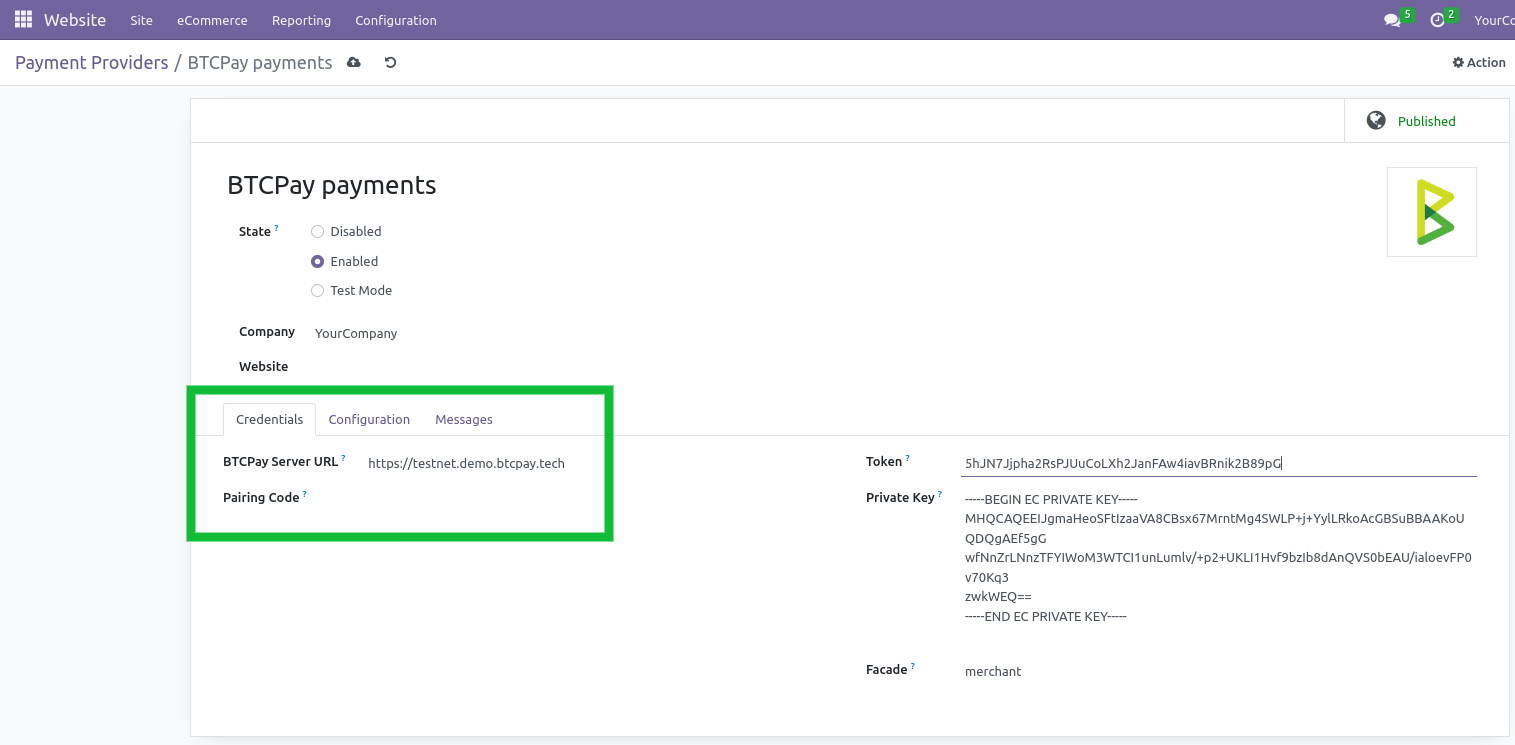
In the BTCPay settings form, tab "Credentials":
|
||||
* Set field "State" to enabled
|
||||
* Set field "BTCPay Server URL" as test or live URL including https://. Example URL: https://testnet.demo.btcpayserver.org
|
||||
* Get a pairing code from your BTCPay Server store:
|
||||
* Go to: Settings -> Access Tokens
|
||||
* Click on "Create Token" button
|
||||
* Label: enter e.g. "My odoo store"
|
||||
* Public Key: leave empty
|
||||
* Click on "Request Pairing" button, on next page click "Approve" button
|
||||
* At the top copy the code next to "Server initiated pairing code", e.g. "hg7z8wN"
|
||||
* Back in Odoo: paste the code into "Pairing Code" field
|
||||
* Hit Tab key on your keyboard (or click on another field) and the pairing process will start automatically
|
||||
* When the pairing is successful the "Token" and "Private Key" field will be filled automatically (see screenshot below)
|
||||
* Field Facade, keep default 'merchant'.
|
||||
|
||||
On the tab "Configuration":
|
||||
* Make sure field "Payment Journal" is set to "Bank", otherwise you can click the dropdown and click on the suggestion "Bank"
|
||||
* Now you can **save** the settings
|
||||
|
||||
Check the payment method is enabled:
|
||||
* Go to **Website** -> **Configuration** -> **Payment Methods**
|
||||
* Make sure "Pay with Bitcoin / Lightning Network" is active
|
||||
|
||||
Congrats, all done. Do some testing to be sure all works.
|
||||
|
||||
|
||||
|
||||
## How does the payment page look?
|
||||
|
||||
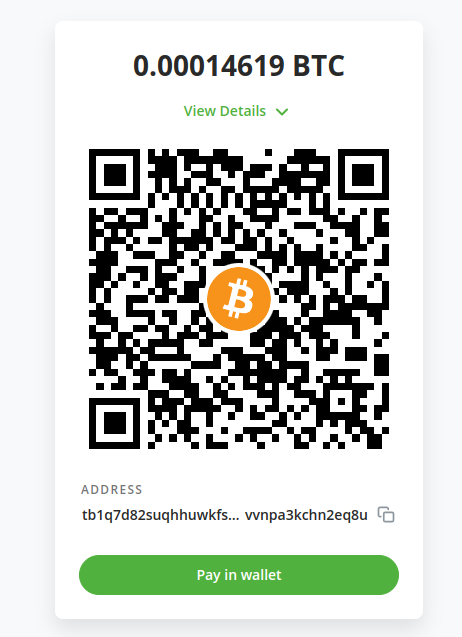
During the checkout the customers will have the option to select the payment method "Pay with Bitcoin / Lightning Network". After selecting they will be redirected to the BTCPay checkout page as shown below.
|
||||
|
||||
|
||||
|
||||
|
||||
## Transaction BTCPay Details
|
||||
In transaction object, you will find more technical information about this method of payment:
|
||||
* Transaction Id: cryptocurrency transaction hash for the executed payout
|
||||
* Invoice Id: the id of the invoice for which you want to fetch an event token
|
||||
* Transaction Status: That indicates state of transaction
|
||||
|
||||
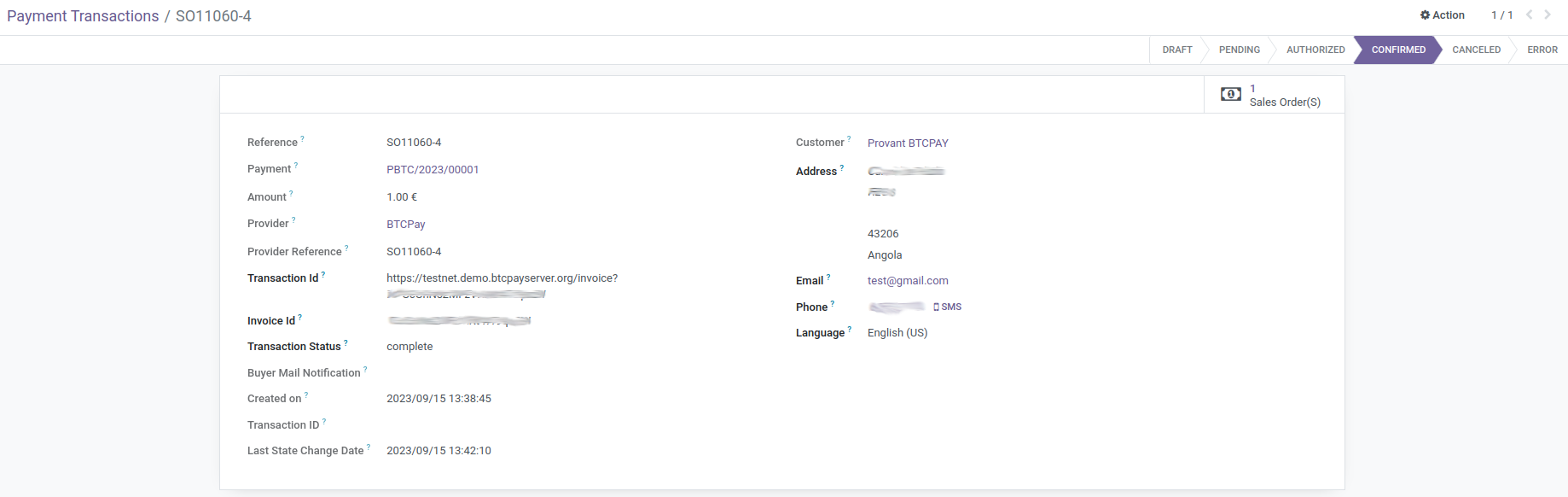
|
||||
|
||||
## Troubleshooting
|
||||
### The order and transaction status does not get updated to "paid"
|
||||
If the BTCPay connection generally works, like redirect to BTCPay checkout page (QR-code) then check your odoo logs and make sure PDF generation generally works. If there are errors mentioning wkhtmltopdf then you need to install `wkhtmltopdf` on your server.
|
||||
@@ -1,14 +0,0 @@
|
||||
# Part of Odoo. See LICENSE file for full copyright and licensing details.
|
||||
|
||||
from . import controllers
|
||||
from . import models
|
||||
|
||||
from odoo.addons.payment import setup_provider, reset_payment_provider
|
||||
|
||||
|
||||
def post_init_hook(env):
|
||||
setup_provider(env, 'btcpayserver')
|
||||
|
||||
|
||||
def uninstall_hook(env):
|
||||
reset_payment_provider(env, 'btcpayserver')
|
||||
@@ -1,47 +0,0 @@
|
||||
#******************************************************************************
|
||||
# PAYMENT BTCPAY SERVER FOR ODOO
|
||||
#
|
||||
# Copyright (C) 2024 Susanna Fort <susannafm@gmail.com>, ndeet
|
||||
#
|
||||
#******************************************************************************
|
||||
#
|
||||
# This program is free software; you can redistribute it and/or
|
||||
# modify it under the terms of the GNU General Public License as
|
||||
# published by the Free Software Foundation; either version 2 of
|
||||
# the License, or any later version.
|
||||
#
|
||||
# This program is distributed in the hope that it will be useful,
|
||||
# but WITHOUT ANY WARRANTY; without even the implied warranty of
|
||||
# MERCHANTABILITY or FITNESS FOR A PARTICULAR PURPOSE. See the
|
||||
# GNU General Public License for more details.
|
||||
#
|
||||
# For a full copy of the GNU General Public License see the LICENSE.txt file.
|
||||
#
|
||||
#******************************************************************************
|
||||
|
||||
{
|
||||
'name': 'Payment Provider: BTCPay Server',
|
||||
'summary': 'This module integrates BTCPAY - pay with Bitcoin - with Odoo v19.0',
|
||||
'author': 'BTCPay Server team and contributors',
|
||||
'website': 'https://github.com/btcpayserver/odoo',
|
||||
'category': 'Accounting/Payment Providers',
|
||||
'version': '19.0.1.0',
|
||||
'license': 'GPL-3',
|
||||
'currency': 'USD',
|
||||
'application': False,
|
||||
'installable': True,
|
||||
'auto_install': False,
|
||||
'depends': ['base', 'account', 'payment'],
|
||||
'data': [
|
||||
'views/payment_btcpayserver_templates.xml',
|
||||
'views/payment_provider_views.xml',
|
||||
'views/payment_transaction_views.xml',
|
||||
'data/payment_provider_data.xml',
|
||||
],
|
||||
'images': ['static/description/BTCPay-Odoo-17-featured.png'],
|
||||
'external_dependencies': {
|
||||
'python': ['btcpay-python']
|
||||
},
|
||||
'post_init_hook': 'post_init_hook',
|
||||
'uninstall_hook': 'uninstall_hook',
|
||||
}
|
||||
@@ -1 +0,0 @@
|
||||
from . import main
|
||||
@@ -1,126 +0,0 @@
|
||||
# ******************************************************************************
|
||||
# PAYMENT BTCPAY FOR ODOO
|
||||
#
|
||||
# Copyright (C) 2020 Susanna Fort <susannafm@gmail.com>
|
||||
#
|
||||
# ******************************************************************************
|
||||
#
|
||||
# This program is free software; you can redistribute it and/or
|
||||
# modify it under the terms of the GNU General Public License as
|
||||
# published by the Free Software Foundation; either version 2 of
|
||||
# the License, or any later version.
|
||||
#
|
||||
# This program is distributed in the hope that it will be useful,
|
||||
# but WITHOUT ANY WARRANTY; without even the implied warranty of
|
||||
# MERCHANTABILITY or FITNESS FOR A PARTICULAR PURPOSE. See the
|
||||
# GNU General Public License for more details.
|
||||
#
|
||||
# For a full copy of the GNU General Public License see the LICENSE.txt file.
|
||||
#
|
||||
# ******************************************************************************
|
||||
|
||||
import json
|
||||
import pprint
|
||||
|
||||
import werkzeug
|
||||
from werkzeug import urls
|
||||
|
||||
from odoo import _, http
|
||||
from odoo.exceptions import ValidationError
|
||||
from odoo.http import request
|
||||
|
||||
from odoo.addons.payment.logging import get_payment_logger
|
||||
from ..models.libs.client import BTCPayClient
|
||||
|
||||
|
||||
_logger = get_payment_logger(__name__)
|
||||
|
||||
|
||||
class BTCPayController(http.Controller):
|
||||
_checkout_url = '/btcpay/checkout'
|
||||
_notify_url = '/payment/btcpay/ipn'
|
||||
_return_url = '/payment/btcpay/return'
|
||||
|
||||
@http.route(_checkout_url, type='http', auth='public', csrf=False, website=True)
|
||||
def checkout(self, **data):
|
||||
|
||||
_logger.info("CHECKOUT: received data:\n%s", pprint.pformat(data))
|
||||
|
||||
# Look up the transaction by reference
|
||||
reference = data.get('reference')
|
||||
tx_sudo = request.env['payment.transaction'].sudo().search([
|
||||
('reference', '=', reference),
|
||||
('provider_code', '=', 'btcpayserver'),
|
||||
], limit=1)
|
||||
if not tx_sudo:
|
||||
raise ValidationError(
|
||||
_("BTCPay: No transaction found matching reference %s.", reference)
|
||||
)
|
||||
|
||||
provider = tx_sudo.provider_id
|
||||
notification_url = str(data.get('notify_url')).replace("http://", "https://")
|
||||
base_url = request.env['ir.config_parameter'].sudo().get_param('web.base.url')
|
||||
redirect_url = urls.url_join(base_url, self._return_url)
|
||||
client = BTCPayClient(host=provider.btcpay_location, pem=provider.btcpay_privateKey, tokens={provider.btcpay_facade: provider.btcpay_token})
|
||||
invoice = client.create_invoice(
|
||||
{"price": data.get('amount'),
|
||||
"currency": data.get('currency_id'),
|
||||
"orderId": data.get('reference'),
|
||||
"token": provider.btcpay_token,
|
||||
"redirectURL": redirect_url,
|
||||
"notificationURL": notification_url,
|
||||
"extendedNotifications": True,
|
||||
"buyer": {"email": data.get('email') or 'noemailavailable@example.com',
|
||||
"name": data.get('name'),
|
||||
"address1": data.get('street'),
|
||||
"locality": data.get('city'),
|
||||
"postalCode": data.get('zip'),
|
||||
"country": data.get('country'),
|
||||
"notify": False}})
|
||||
_logger.info('Invoice %s \n NOTIFY URL: %s', invoice, notification_url)
|
||||
return werkzeug.utils.redirect(invoice['url'])
|
||||
|
||||
@http.route(_notify_url, type='jsonrpc', auth='public', csrf=False)
|
||||
def btcpay_ipn(self, **post):
|
||||
""" BTCPay IPN. """
|
||||
_logger.info('BTCPAY IPN RECEIVED...')
|
||||
data = json.loads(request.httprequest.data)
|
||||
_logger.info("%s", pprint.pformat(data))
|
||||
try:
|
||||
reference = data['data']['orderId']
|
||||
invoice_id = data['data']['id']
|
||||
|
||||
# Look up the transaction by reference
|
||||
tx_sudo = request.env['payment.transaction'].sudo().search([
|
||||
('reference', '=', reference),
|
||||
('provider_code', '=', 'btcpayserver'),
|
||||
], limit=1)
|
||||
if not tx_sudo:
|
||||
_logger.warning("No transaction found matching reference %s.", reference)
|
||||
return ''
|
||||
|
||||
provider = tx_sudo.provider_id
|
||||
client = BTCPayClient(host=provider.btcpay_location, pem=provider.btcpay_privateKey,
|
||||
tokens={provider.btcpay_facade: provider.btcpay_token})
|
||||
|
||||
fetched_invoice = client.get_invoice(invoice_id)
|
||||
_logger.info('fetched_invoice = %s', pprint.pformat(fetched_invoice))
|
||||
|
||||
payment_data = {
|
||||
"reference": fetched_invoice['orderId'],
|
||||
"status": fetched_invoice['status'],
|
||||
"invoiceID": fetched_invoice['id'],
|
||||
"txid": fetched_invoice['url'],
|
||||
}
|
||||
|
||||
# Use the new Odoo 19 _process() pipeline
|
||||
tx_sudo._process('btcpayserver', payment_data)
|
||||
except ValidationError:
|
||||
_logger.exception("Unable to handle the notification data; skipping to acknowledge")
|
||||
return ''
|
||||
|
||||
@http.route(_return_url, type='http', auth="public", methods=['GET'], csrf=False, save_session=False)
|
||||
def btcpay_return_from_redirect(self, **data):
|
||||
""" BTCPay return """
|
||||
_logger.info("BTCPay: user returned to shop after payment")
|
||||
return request.redirect('/payment/status')
|
||||
@@ -1,26 +0,0 @@
|
||||
<?xml version="1.0" encoding="utf-8"?>
|
||||
<odoo noupdate="1">
|
||||
|
||||
<record id="payment_method_btcpayserver" model="payment.method">
|
||||
<field name="name">Pay with Bitcoin / Lightning Network</field>
|
||||
<field name="code">btcpayserver</field>
|
||||
<field name="active">True</field>
|
||||
<field name="image" type="base64" file="payment_btcpayserver/static/description/icon.png"/>
|
||||
<field name="support_tokenization">False</field>
|
||||
<field name="support_express_checkout">False</field>
|
||||
</record>
|
||||
|
||||
<record id="payment_provider_btcpayserver" model="payment.provider">
|
||||
<field name="name">BTCPay Server payments</field>
|
||||
<field name="code">btcpayserver</field>
|
||||
<field name="image_128" type="base64" file="payment_btcpayserver/static/description/icon.png"/>
|
||||
<field name="redirect_form_view_id" ref="redirect_form"/>
|
||||
<field name="module_id" ref="base.module_payment_btcpayserver"/>
|
||||
<field name="payment_method_ids"
|
||||
eval="[Command.set([
|
||||
ref('payment_btcpayserver.payment_method_btcpayserver'),
|
||||
])]"
|
||||
/>
|
||||
</record>
|
||||
|
||||
</odoo>
|
||||
@@ -1 +0,0 @@
|
||||
from . import payment_provider, payment_transaction
|
||||
@@ -1,48 +0,0 @@
|
||||
from odoo import _, api, fields, models
|
||||
from .libs.client import BTCPayClient
|
||||
from .libs import crypto
|
||||
|
||||
from odoo.addons.payment.logging import get_payment_logger
|
||||
|
||||
|
||||
_logger = get_payment_logger(__name__)
|
||||
|
||||
|
||||
class PaymentProvider(models.Model):
|
||||
_inherit = 'payment.provider'
|
||||
|
||||
code = fields.Selection(
|
||||
selection_add=[('btcpayserver', "BTCPay")], ondelete={'btcpayserver': 'set default'})
|
||||
|
||||
btcpay_location = fields.Char(string='BTCPay Server URL', size=64, help='URL where your BTCPay Server instance is reachable (where you log into your BTCPay Server).', default='https://testnet.demo.btcpayserver.org')
|
||||
btcpay_pairingCode = fields.Char(string='Pairing Code', help='Create paring Code in your BTCPay server and put here')
|
||||
|
||||
btcpay_token = fields.Char(string='Token', help='Access Token to BTCPay. Leave empty, will be autogenerated during pairing.')
|
||||
btcpay_privateKey = fields.Text(string='Private Key', help='Private Key for BTCPay Client. Leave empty, will be autogenerated during pairing.')
|
||||
btcpay_facade = fields.Char(string='Facade', help='Token facade type: merchant/pos/payroll. Keep merchant', default='merchant')
|
||||
|
||||
def create(self, values_list):
|
||||
if self.code == 'btcpayserver':
|
||||
values_list['btcpay_privateKey'] = crypto.generate_privkey()
|
||||
|
||||
return super(PaymentProvider, self).create(values_list)
|
||||
|
||||
@api.onchange('btcpay_pairingCode')
|
||||
def _onchange_pairingCode(self):
|
||||
if not self.btcpay_token and self.code == 'btcpayserver' and not self.btcpay_pairingCode == '':
|
||||
self.btcpay_privateKey = crypto.generate_privkey()
|
||||
client = BTCPayClient(host=self.btcpay_location, pem=self.btcpay_privateKey)
|
||||
token = client.pair_client(self.btcpay_pairingCode)
|
||||
self.btcpay_token = token.get(self.btcpay_facade)
|
||||
|
||||
@api.onchange('btcpay_token')
|
||||
def _onchange_token(self):
|
||||
if self.code == 'btcpayserver':
|
||||
self.btcpay_pairingCode = ''
|
||||
|
||||
@api.onchange('btcpay_location')
|
||||
def _onchange_location(self):
|
||||
if self.code == 'btcpayserver':
|
||||
self.btcpay_token = ''
|
||||
self.btcpay_privateKey = ''
|
||||
self.btcpay_pairingCode = ''
|
||||
@@ -1,118 +0,0 @@
|
||||
import pprint
|
||||
|
||||
from odoo import _, api, fields, models
|
||||
|
||||
from odoo.addons.payment import utils as payment_utils
|
||||
from odoo.addons.payment.logging import get_payment_logger
|
||||
|
||||
|
||||
_logger = get_payment_logger(__name__)
|
||||
|
||||
|
||||
class PaymentTransaction(models.Model):
|
||||
_inherit = 'payment.transaction'
|
||||
|
||||
btcpay_invoiceId = fields.Char("Invoice Id")
|
||||
btcpay_txid = fields.Char("Transaction Id")
|
||||
btcpay_status = fields.Char("Transaction Status")
|
||||
api_url = '/btcpay/checkout'
|
||||
checkout_url = '/btcpay/checkout'
|
||||
notify_url = 'payment/btcpay/ipn'
|
||||
|
||||
def _get_specific_rendering_values(self, processing_values):
|
||||
""" Override of payment to return BTCPay-specific rendering values.
|
||||
|
||||
Note: self.ensure_one() from `_get_processing_values`
|
||||
|
||||
:param dict processing_values: The generic and specific processing values of the transaction
|
||||
:return: The dict of provider-specific processing values
|
||||
:rtype: dict
|
||||
"""
|
||||
res = super()._get_specific_rendering_values(processing_values)
|
||||
|
||||
if self.provider_code != 'btcpayserver':
|
||||
return res
|
||||
|
||||
base_url = self.provider_id.get_base_url()
|
||||
partner_first_name, partner_last_name = payment_utils.split_partner_name(self.partner_name)
|
||||
|
||||
return {
|
||||
'address1': self.partner_address,
|
||||
'amount': self.amount,
|
||||
'city': self.partner_city,
|
||||
'country': self.partner_country_id.code,
|
||||
'currency_code': self.currency_id.name,
|
||||
'email': self.partner_email,
|
||||
'first_name': partner_first_name,
|
||||
'item_name': f"{self.company_id.name}: {self.reference}",
|
||||
'item_number': self.reference,
|
||||
'last_name': partner_last_name,
|
||||
'lc': self.partner_lang,
|
||||
'state': self.partner_state_id.name,
|
||||
'zip_code': self.partner_zip,
|
||||
'api_url': self.checkout_url,
|
||||
'notify_url': base_url + self.notify_url,
|
||||
}
|
||||
|
||||
@api.model
|
||||
def _extract_reference(self, provider_code, payment_data):
|
||||
""" Override of payment to extract the transaction reference from BTCPay data.
|
||||
|
||||
:param str provider_code: The code of the provider handling the transaction.
|
||||
:param dict payment_data: The payment data sent by the provider.
|
||||
:return: The transaction reference.
|
||||
:rtype: str
|
||||
"""
|
||||
if provider_code != 'btcpayserver':
|
||||
return super()._extract_reference(provider_code, payment_data)
|
||||
|
||||
return payment_data.get('reference')
|
||||
|
||||
def _extract_amount_data(self, payment_data):
|
||||
""" Override of payment to skip amount validation for BTCPay.
|
||||
|
||||
BTCPay invoices handle amount validation on the BTCPay server side,
|
||||
so we skip the Odoo-side validation.
|
||||
|
||||
:param dict payment_data: The payment data sent by the provider.
|
||||
:return: None to skip validation.
|
||||
:rtype: None
|
||||
"""
|
||||
if self.provider_code != 'btcpayserver':
|
||||
return super()._extract_amount_data(payment_data)
|
||||
|
||||
return None
|
||||
|
||||
def _apply_updates(self, payment_data):
|
||||
""" Override of payment to process the transaction based on BTCPay data.
|
||||
|
||||
Note: self.ensure_one() from `_process`
|
||||
|
||||
:param dict payment_data: The payment data sent by the provider.
|
||||
:return: None
|
||||
"""
|
||||
if self.provider_code != 'btcpayserver':
|
||||
return super()._apply_updates(payment_data)
|
||||
|
||||
_logger.info("BTCPay _apply_updates: %s", pprint.pformat(payment_data))
|
||||
|
||||
self.provider_reference = payment_data.get('reference')
|
||||
self.btcpay_txid = payment_data.get('txid')
|
||||
self.btcpay_status = payment_data.get('status')
|
||||
|
||||
if self.btcpay_status in ['paid', 'processing']:
|
||||
self._set_pending(state_message=payment_data.get('pending_reason'))
|
||||
elif self.btcpay_status in ['confirmed', 'complete']:
|
||||
self._set_done()
|
||||
elif self.btcpay_status in ['new']:
|
||||
self.btcpay_invoiceId = payment_data.get('invoiceID')
|
||||
elif self.btcpay_status in ['cancel', 'cancelled']:
|
||||
self._set_canceled()
|
||||
elif self.btcpay_status in ['invalid']:
|
||||
_logger.info(
|
||||
"Received data with invalid payment status (%s) for transaction with reference %s",
|
||||
self.btcpay_status, self.reference
|
||||
)
|
||||
self._set_error(
|
||||
"BTCPay: " + _("Received data with invalid payment status: %s", self.btcpay_status)
|
||||
)
|
||||
@@ -1 +0,0 @@
|
||||
btcpay-python
|
||||

|
Before Width: | Height: | Size: 154 KiB |

|
Before Width: | Height: | Size: 25 KiB |

|
Before Width: | Height: | Size: 109 KiB |

|
Before Width: | Height: | Size: 90 KiB |
@@ -1,194 +0,0 @@
|
||||
<html xmlns="http://www.w3.org/1999/html">
|
||||
<body>
|
||||
|
||||
<section class="oe_container">
|
||||
<div class="oe_row oe_spaced">
|
||||
<h2 class="oe_slogan">BTCPay Server Gateway</h2>
|
||||
<h3 class="oe_slogan">This module allows you to accept Bitcoin / Lightning Network (and other cryptocurrency) payments in your Odoo e-commerce store.</h3>
|
||||
<div class="oe_span12">
|
||||
<div class="oe_bg_img">
|
||||
<img src="BTCPay-Odoo-17-featured.png" class="oe_picture oe_screenshot">
|
||||
</div>
|
||||
</div>
|
||||
</div>
|
||||
<div class="oe_row oe_spaced">
|
||||
<p class="oe_mt32">
|
||||
BTCPay Server for Odoo is a revolutionary, self-hosted, open-source payment gateway to accept Bitcoin payments. Our seamless integration with Odoo allows you to connect your self-hosted BTCPay Server and start accepting Bitcoin payments in just a few simple steps.
|
||||
</p>
|
||||
</div>
|
||||
</section>
|
||||
|
||||
<section class="oe_container">
|
||||
<div class="oe_row oe_spaced">
|
||||
<h2 class="oe_slogan">Features</h2>
|
||||
<div class="oe_span12">
|
||||
<p class="oe_mt32">
|
||||
<ul>
|
||||
<li><strong>Zero fees</strong>: Enjoy a payment gateway with no fees. Yes, really!</li>
|
||||
<li><strong>Fully automated system</strong>: BTCPay takes care of payments, invoice management and refunds automatically.</li>
|
||||
<li><strong>Display Bitcoin QR code at checkout</strong>: Enhance customer experience with an easy and secure payment option.</li>
|
||||
<li><strong>No middlemen or KYC</strong>:
|
||||
<ul>
|
||||
<li>Direct, P2P payments (going directly to your wallet)</li>
|
||||
<li>Say goodbye to intermediaries and tedious paperwork</li>
|
||||
<li>Transaction information is only shared between you and your customer</li>
|
||||
</ul>
|
||||
</li>
|
||||
<li><strong>Self-hosted infrastructure</strong>: Maintain full control over your payment gateway.</li>
|
||||
<li><strong>Direct wallet payments</strong>: Be your own bank with a self-custodial service.</li>
|
||||
<li><strong>Lightning Network</strong> integrated out of the box – instant, fast and low cost payments and payouts</li>
|
||||
<li><strong>Reporting and accounting</strong> – CSV exports</li>
|
||||
<li><strong>Advanced invoice managemen</strong>t and refunding integrated in the WooCommerce UI</li>
|
||||
<li><strong>Real-time exchange price tracking</strong> for correct payment amounts</li>
|
||||
<li><strong>Versatile plugin system</strong>:
|
||||
<ul>
|
||||
<li>Extend functionality according to your needs</li>
|
||||
<li>Accept payments in altcoins through various plugins</li>
|
||||
</ul>
|
||||
</li>
|
||||
<li><strong>Elegant checkout design</strong>: Compatible with all Bitcoin wallets and enhanced with your store’s logo and branding for a unique UX.</li>
|
||||
<li><strong>Point-of-sale</strong> integration – Accept payments in your physical shops</li>
|
||||
<li><strong>Multilingual ready</strong>: Serve a global audience right out of the box.</li>
|
||||
<li><strong>Top-notch privacy and security</strong>: Protect your and your customers’ data.</li>
|
||||
<li><strong>Community-driven support</strong>: Get responsive assistance from our dedicated community (<a href="http://chat.btcpayserver.org" rel="nofollow ugc">Mattermost</a> or <a href="https://t.me/btcpayserver" rel="nofollow ugc">Telegram</a>).</li>
|
||||
</ul>
|
||||
</p>
|
||||
</div>
|
||||
</div>
|
||||
</section>
|
||||
|
||||
|
||||
|
||||
<section class="oe_container">
|
||||
<div class="oe_row oe_spaced">
|
||||
<h2 class="oe_slogan">Requirements</h2>
|
||||
<div class="oe_span12">
|
||||
<p class="oe_mt32">
|
||||
<ul>
|
||||
<li>Odoo 17 running</li>
|
||||
<li>eCommerce module enabled</li>
|
||||
<li>You have a BTCPay Server version 1.10.0 or later, either <a href="https://docs.btcpayserver.org/Deployment/">self-hosted</a> or <a href="https://docs.btcpayserver.org/Deployment/ThirdPartyHosting/">hosted by a third-party</a></li>
|
||||
<li><a href="https://docs.btcpayserver.org/RegisterAccount/" class="">You've a registered account on the instance</a></li>
|
||||
<li><a href="https://docs.btcpayserver.org/CreateStore/" class="">You've a BTCPay store on the instance</a></li>
|
||||
<li><a href="https://docs.btcpayserver.org/WalletSetup/" class="">You've a wallet connected to your store</a></li>
|
||||
</ul>
|
||||
</p>
|
||||
</div>
|
||||
</div>
|
||||
</section>
|
||||
|
||||
<section class="oe_container">
|
||||
<div class="oe_row oe_spaced">
|
||||
<h2 class="oe_slogan">Install the module</h2>
|
||||
<div class="oe_span12">
|
||||
<p class="oe_mt32">
|
||||
<ul>
|
||||
<li>Clone our [repository](https://github.com/btcpayserver/odoo) or download the .zip from the [releases page](https://github.com/btcpayserver/odoo/releases)
|
||||
<li>Make sure you are on branch `17.0` or downloaded a release tagged with version v17.x
|
||||
<li>Place the `payment_btcpayserver` directory in your Odoo addons directory
|
||||
<li>Install dependencies by running `pip install -r requirements.txt` (from inside the `payment_btcpayserver` directory)
|
||||
<li>Restart Odoo
|
||||
<li>Go to Apps -> Update Apps List
|
||||
<li>Remove the "Apps" filter and search for "btcpay"
|
||||
<li>Click **Activate** button
|
||||
</ul>
|
||||
</p>
|
||||
</div>
|
||||
</div>
|
||||
</section>
|
||||
|
||||
<section class="oe_container">
|
||||
<div class="oe_row oe_spaced">
|
||||
<h2 class="oe_slogan">Configure BTCPay as payment provider</h2>
|
||||
<div class="oe_span6">
|
||||
<p class="oe_mt32">
|
||||
<ul>
|
||||
<li>Go to <strong>Website</strong> -> <strong>Configuration</strong> -> <strong>Payment Providers</strong></li>
|
||||
<li>Search for BTCPay and click on button <strong>Activate</strong></li>
|
||||
</ul>
|
||||
|
||||
<p>In the BTCPay settings form, tab "Credentials":</p>
|
||||
<ul>
|
||||
<li>Set field "State" to enabled</li>
|
||||
<li>Set field "BTCPay Server URL" as test or live URL including https://. Example URL: <a href="https://testnet.demo.btcpayserver.org">https://testnet.demo.btcpayserver.org</a></li>
|
||||
<li>Get a pairing code from your BTCPay Server store: Settings -> Access Tokens
|
||||
<ul>
|
||||
<li>Click on "Create Token" button</li>
|
||||
<li>Label: enter e.g. "My odoo store"</li>
|
||||
<li>Public Key: leave empty</li>
|
||||
<li>Click on "Request Pairing" button, on next page click "Approve" button</li>
|
||||
<li>At the top copy the code next to "Server initiated pairing code", e.g. "hg7z8wN"</li>
|
||||
</ul>
|
||||
</li>
|
||||
<li>Back in Odoo, paste the code into "Pairing Code" field</li>
|
||||
<li>Hit Tab key on your keyboard (or click on another field) and the pairing process will start automatically</li>
|
||||
<li>When the pairing is successful the "Token" and "Private Key" field will be filled automatically</li>
|
||||
<li>Field Facade, keep default 'merchant'.</li>
|
||||
</ul>
|
||||
|
||||
<p>On the tab "Configuration":</p>
|
||||
<ul>
|
||||
<li>Make sure field "Payment Journal" is set to "Bank", otherwise you can click the dropdown and click on the suggestion "Bank"</li>
|
||||
<li>Now you can <strong>save</strong> the settings</li>
|
||||
</ul>
|
||||
|
||||
<p>Check the payment method is enabled:</p>
|
||||
<ul>
|
||||
<li>Go to <strong>Website</strong> -> <strong>Configuration</strong> -> <strong>Payment Methods</strong></li>
|
||||
<li>Make sure "Pay with Bitcoin / Lightning Network" is active</li>
|
||||
</ul>
|
||||
|
||||
<p>Congrats, all done. Do some testing to be sure all works.</p>
|
||||
|
||||
</p>
|
||||
</div>
|
||||
<div class="oe_span6">
|
||||
<div class="oe_bg_img">
|
||||
<img src="BTCPayPaymentSettings.png" class="oe_picture oe_screenshot">
|
||||
</div>
|
||||
</div>
|
||||
</div>
|
||||
</section>
|
||||
|
||||
<section class="oe_container">
|
||||
<div class="oe_row oe_spaced">
|
||||
<h2 class="oe_slogan">How it looks like?</h2>
|
||||
<div class="oe_span6">
|
||||
<div class="oe_bg_img">
|
||||
<img src="BTCPayLooksLike.png" class="oe_picture oe_screenshot">
|
||||
</div>
|
||||
</div>
|
||||
<div class="oe_span6">
|
||||
<p class="oe_mt32">
|
||||
<ul>
|
||||
In payment webpage where payment methods appear, you will find new payment method called BTCPay.
|
||||
If you click on it you will be redirect to the server that you indicate in location field.
|
||||
</ul>
|
||||
</p>
|
||||
</div>
|
||||
</div>
|
||||
</section>
|
||||
|
||||
<section class="oe_container">
|
||||
<div class="oe_row oe_spaced">
|
||||
<h2 class="oe_slogan">Transaction BTCPay Details</h2>
|
||||
<div class="oe_span6">
|
||||
<p class="oe_mt32">
|
||||
<ul>
|
||||
In transaction object, you will find more technical information about this method of payment:
|
||||
<li>Transaction Id: cryptocurrency transaction hash for the executed payout.</li>
|
||||
<li>Invoice Id: the id of the invoice for which you want to fetch an event token</li>
|
||||
<li>Transaction Status: That indicates state of transaction</li>
|
||||
</ul>
|
||||
</p>
|
||||
</div>
|
||||
<div class="oe_span6">
|
||||
<div class="oe_bg_img">
|
||||
<img src="BtcpayTxDetails.png" class="oe_picture oe_screenshot">
|
||||
</div>
|
||||
</div>
|
||||
</div>
|
||||
</section>
|
||||
|
||||
</body>
|
||||
</html>
|
||||
@@ -1,25 +0,0 @@
|
||||
<?xml version="1.0" encoding="utf-8"?>
|
||||
<odoo>
|
||||
|
||||
<template id="redirect_form">
|
||||
<form t-att-action="api_url" method="post">
|
||||
<input type="hidden" name="reference" t-att-value="item_number"/>
|
||||
<input type="hidden" name="name" t-att-value="first_name"/>
|
||||
<input type="hidden" name="email" t-att-value="email"/>
|
||||
<input type="hidden" name="street" t-att-value="address1"/>
|
||||
<input type="hidden" name="zip" t-att-value="zip_code"/>
|
||||
<input type="hidden" name="city" t-att-value="city"/>
|
||||
<input type="hidden" name="currency_id" t-att-value="currency_code"/>
|
||||
<input type="hidden" name="country" t-att-value="country"/>
|
||||
<input type="hidden" name="custom" t-att-value="item_name"/>
|
||||
<input type="hidden" name="amount" t-att-value="amount"/>
|
||||
<input type="hidden" name="notify_url" t-att-value="notify_url"/>
|
||||
<button type="submit" width="100px" t-att-class="submit_class">
|
||||
<img t-if="not submit_txt" src="/static/description/icon.png"/>
|
||||
<span t-if="submit_txt"> <t t-esc="submit_txt"/> <span class="fa fa-long-arrow-right"/>
|
||||
</span>
|
||||
</button>
|
||||
</form>
|
||||
</template>
|
||||
|
||||
</odoo>
|
||||
@@ -1,23 +0,0 @@
|
||||
<?xml version="1.0" encoding="utf-8"?>
|
||||
<odoo>
|
||||
|
||||
<record id="payment_provider_form" model="ir.ui.view">
|
||||
<field name="name">BTCPay Provider Form</field>
|
||||
<field name="model">payment.provider</field>
|
||||
<field name="inherit_id" ref="payment.payment_provider_form"/>
|
||||
<field name="arch" type="xml">
|
||||
<group name="provider_credentials" position='inside'>
|
||||
<group invisible="code != 'btcpayserver'">
|
||||
<field name="btcpay_location"/>
|
||||
<field name="btcpay_pairingCode"/>
|
||||
</group>
|
||||
<group invisible="code != 'btcpayserver'">
|
||||
<field name="btcpay_token"/>
|
||||
<field name="btcpay_privateKey"/>
|
||||
<field name="btcpay_facade"/>
|
||||
</group>
|
||||
</group>
|
||||
</field>
|
||||
</record>
|
||||
|
||||
</odoo>
|
||||
@@ -1,17 +0,0 @@
|
||||
<?xml version="1.0" encoding="utf-8"?>
|
||||
<odoo>
|
||||
|
||||
<record id="payment_transaction_form" model="ir.ui.view">
|
||||
<field name="name">BTCPay Transaction Form</field>
|
||||
<field name="model">payment.transaction</field>
|
||||
<field name="inherit_id" ref="payment.payment_transaction_form"/>
|
||||
<field name="arch" type="xml">
|
||||
<field name="provider_reference" position="after">
|
||||
<field name="btcpay_txid"/>
|
||||
<field name="btcpay_invoiceId" />
|
||||
<field name="btcpay_status"/>
|
||||
</field>
|
||||
</field>
|
||||
</record>
|
||||
|
||||
</odoo>
|
||||